AI Agents
Last updated
AgentLaire AI Agents is a paid module (agentlaire_agent), $199 one-time per Odoo version. It needs the free AgentLaire AI Control and works on Odoo 18, 19 and 20 Community, self-hosted. See the product page.
How do I chat with an agent in Discuss?
Section titled “How do I chat with an agent in Discuss?”AgentLaire AI Agents gives every agent with Chat turned on a contact in Odoo Discuss. Open a direct chat with that contact and type your question. The agent works as you: it reads only what your Odoo access rights allow.
- A thinking indicator and the latest steps show while the agent works.
- The answer is posted in the chat, with lists, tables and links.
- Follow-up questions work because the agent sees the recent messages of the chat.
- A side panel shows the agent, its tools, the record in context and the steps of the latest run.
Installing the module creates an agent called AgentLaire AI and makes it the default agent.
How do I ask AI about a record?
Section titled “How do I ask AI about a record?”AgentLaire AI Agents adds an Ask AI button to the top bar and to the chatter. The top bar button opens a chat with the default agent. If a record is open, it is passed as context. The chatter button appears on records of models that have an applicable tool policy.
The record shows in the composer as a chip. Remove the chip and later runs no longer read the record.
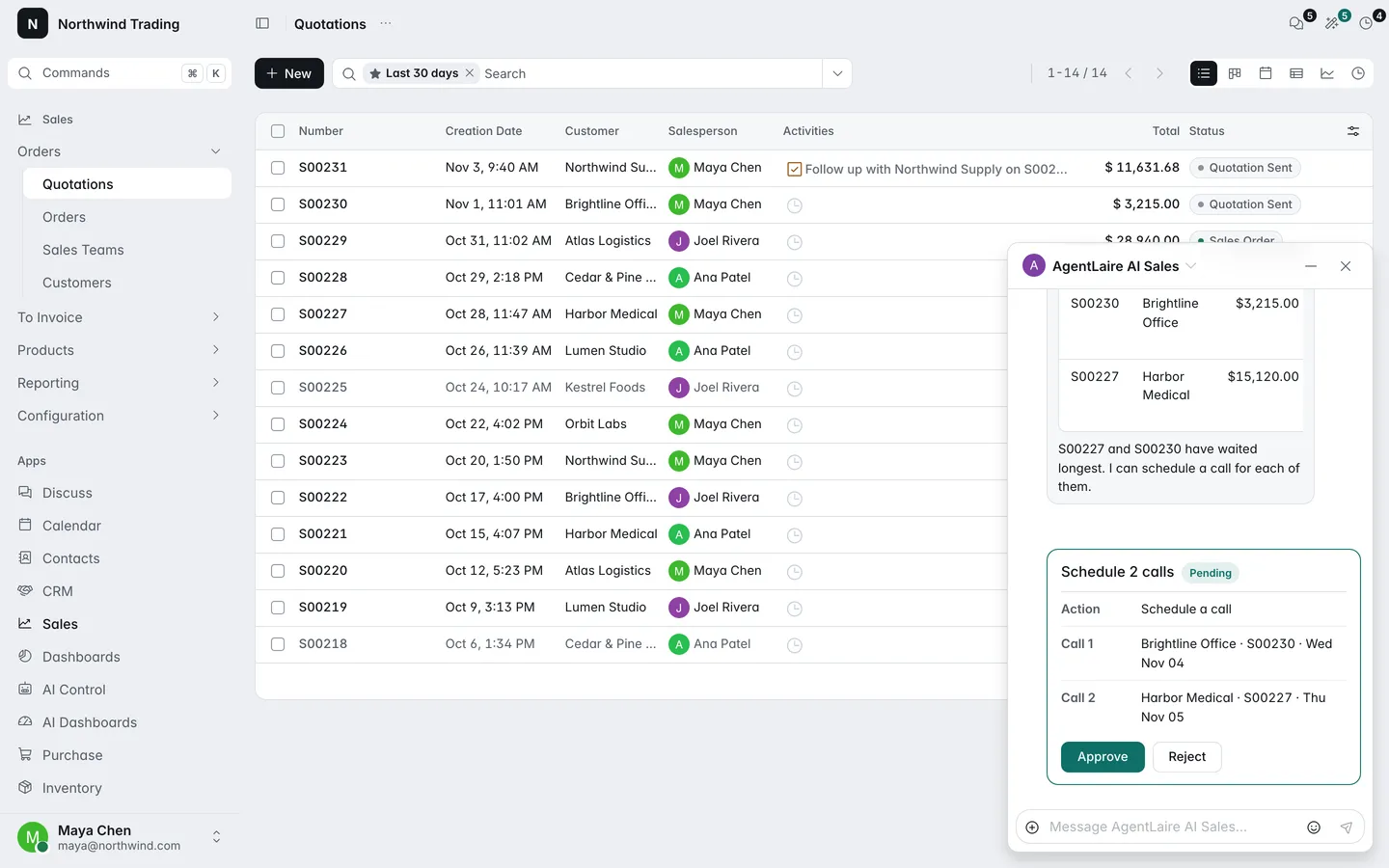
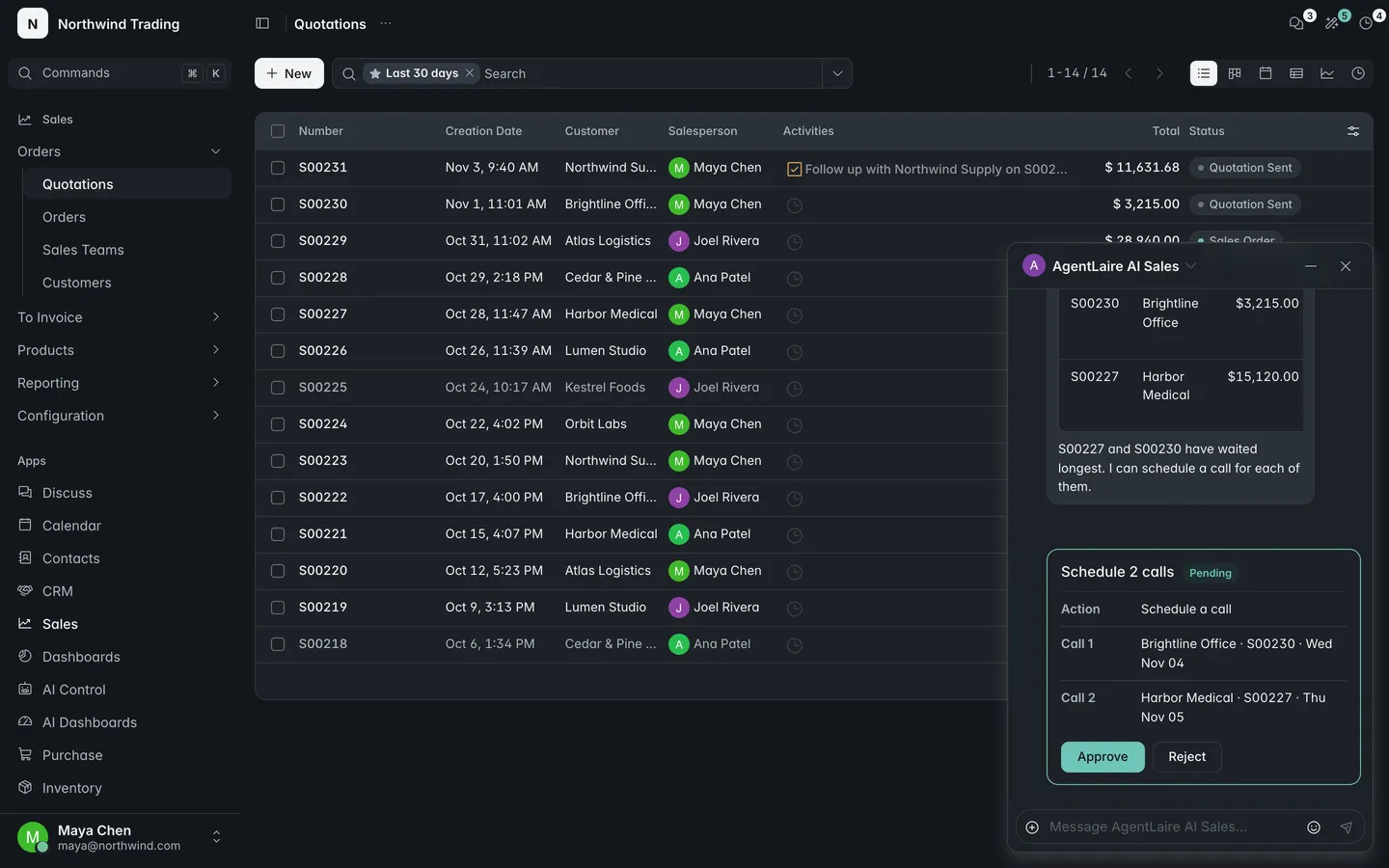
What happens when an agent wants to change something?
Section titled “What happens when an agent wants to change something?”AgentLaire AI Agents never changes a record on its own by default. A change becomes a proposal, a card in the chat with Approve and Reject, and it executes only after a person approves it. Open proposals are also listed in AI Control › Approvals. The Approvals article covers cards, the inbox, undo and changes allowed in advance.
How do I set up agents?
Section titled “How do I set up agents?”AgentLaire AI Agents lets AI Managers define agents in AI Control › Configuration › Agents › Agents. An agent form has these parts:
- Instructions: what the agent is for and how it answers.
- Skills and tools: skills bundle instructions and tools. Tools added directly show in one list, tools from skills in a read-only list. More than 20 tools gives a warning.
- Access: the groups that may use the agent (empty means everyone), the surfaces it serves (Chat, MCP, Triggers), Tool call limit and Confirm in chat.
- Model: a provider and model for this agent. Empty uses the default provider.
Click Test run on the form to try the agent with a prompt you type. Agents are listed with their last run and their error rate over the last 7 days.
Tools follow the policies in AI Control › Configuration › Governance › Policies. A policy sets, per model, the operations, fields, records and limits an agent has. New policies allow no writes and always require approval.
Which skills come with AgentLaire AI Agents?
Section titled “Which skills come with AgentLaire AI Agents?”AgentLaire AI Agents ships three starter skills: Business reporting (sales orders and lines, stock quantities, purchase orders), Quotation drafting (find customers and products, propose a quotation with lines) and Lead summary (read a lead and its messages). They are created only for apps you have installed, and their policies start inactive.
To use one, open AI Control › Configuration › Agents › Skills, open the skill and click Enable. A dialog lists the operations and fields its policies allow, and enabling activates them. Disable archives them again. Add starter skills in AI Control › Configuration › Settings adds skills for apps you installed later. Pack modules such as AI Sales & CRM add skills of their own.
How do I run an agent without a chat?
Section titled “How do I run an agent without a chat?”AgentLaire AI Agents can start an agent from a schedule, a button or an automation rule. The agent must have Triggers turned on.
Schedules: in AI Control › Configuration › Agents › Schedules a manager sets an agent, a prompt, an interval (Repeat every a number of hours, days, weeks or months) and Run as. Missed runs are not caught up. A schedule is skipped when the user cannot use the agent or the kill switch is on.
Automation rules and buttons: in an automation rule, scheduled action or button, add an action of type Run AI agent. Set the AI agent, a Prompt, Run mode, Run as and Runs per hour.
- The prompt takes plain text and
{{ record.field }}placeholders, including paths such asrecord.partner_id.name. No expressions or code. - Run mode is In the background (one run per record, no one waiting) or In the agent chat (a button on one record opens your chat and posts the prompt).
- Run as is the record’s responsible user (default), the user who triggered it, or a fixed user. Fallback user for triggers in the settings covers records with no internal user.
Triggers have limits. Runs started in the background are non-interactive, so every change they propose goes to the approval queue. A trigger is skipped, with a trigger_skipped audit event, when:
- the action already started its hourly limit of runs (default 60) in the last 60 minutes
- a run of the same action for the same record is still open
- the change that fired it came from an approved or automatic agent write, which prevents loops
- the kill switch is on, or the run-as user cannot be found or may not use the agent
A skipped trigger never makes the operation that fired it fail.
How do I connect an outside AI client over MCP?
Section titled “How do I connect an outside AI client over MCP?”AgentLaire AI Agents can serve its tools over the Model Context Protocol (MCP), so clients such as Claude Code and Codex can use your agents. The endpoint is off after install. An AI Manager turns it on with MCP endpoint in the settings and ticks MCP on each agent clients may use. Users create their own MCP keys in My Preferences, on the Security tab, under MCP Keys. A key is shown once.
A client works with your own access rights, and every write it asks for waits in the approval queue. For the setup, see Connect Claude Desktop over MCP.
What are the AgentLaire AI Agents settings?
Section titled “What are the AgentLaire AI Agents settings?”AgentLaire AI Agents adds these to AI Control › Configuration › Settings, which needs an AI Manager who is also an Odoo administrator.
| Setting | Default | What it does |
|---|---|---|
| Default agent | AgentLaire AI | Agent the top bar Ask AI button opens. |
| Starter skills | Added at install for the apps present | The Add starter skills button adds skills for apps installed since. |
| Revert window | 7 days | How long after an agent’s change a manager or its approver can still revert it. |
| Fallback user for triggers | None | Runs a trigger as this user when its run-as rule finds no internal user. |
| MCP endpoint | Off | Lets outside AI clients use agents that serve MCP. |
| Allowed origins | Empty | Web origins that may call the endpoint from a browser. |
Each MCP key has its own expiry (90 days by default, one year at most) and rate limit (60 requests per minute).